Touchgrind Skate 2
Illusion LabsSports
3.814.18K Reviews
- Version
- 2.3.2
- Installs
- 50.00M
- Age Rating
- Everyone
Screenshots
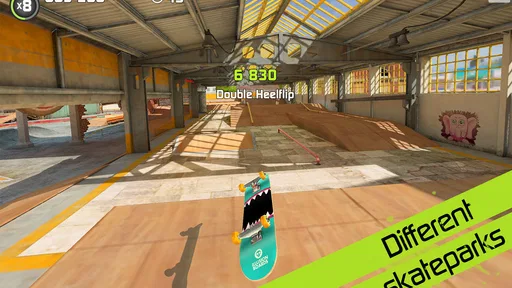
Our Review of Touchgrind Skate 2
 Analysis by Appyee
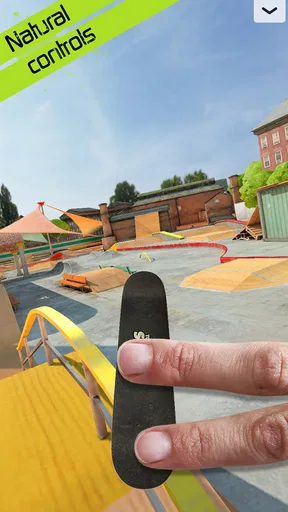
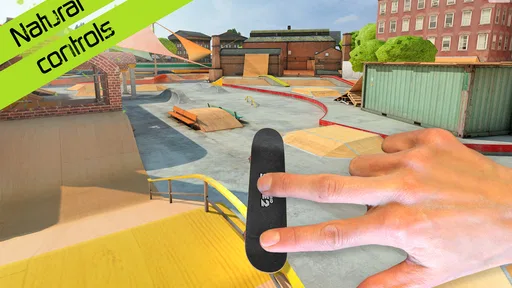
I approached Touchgrind Skate 2 expecting a quick skateboarding diversion, but its control scheme immediately made it feel more like a small skill exercise than a conventional mobile sports game. Instead of steering with a virtual character, I use two fingers directly on the board: one controls the front area and the other controls the rear. That choice changes everything. A simple turn depends on finger placement, pressure, timing, and how confidently I release the board.
That directness is the main reason I kept returning to it. The game is free, belongs to the sports category, and comes from Illusion Labs, but it does not play like a simplified arcade title built around tapping a single button. It asks me to learn a physical rhythm. The first few attempts can feel awkward, especially if I am used to games with a visible skater and familiar left-right controls. Once the hand position starts to make sense, however, landing a clean trick becomes genuinely satisfying.
How the two-finger workflow feels in everyday play
My most useful baseline routine was to spend a few minutes simply moving, turning, and stopping before trying to chain tricks. This sounds obvious, but the game rewards that patience. I learned more by watching how the board reacted to small finger movements than by immediately attempting the most impressive-looking maneuver. The board can rotate or tilt faster than I expect, so a light, controlled touch is often better than a dramatic swipe.
A typical short session works well during a commute break or while waiting for an appointment. I can open the game, try a particular movement several times, and stop without needing a long story or complicated setup. That makes it easy to use in small bursts. The trade-off is that progress depends on attention. If I am distracted, the controls feel unforgiving rather than relaxing, because the game is asking me to coordinate both thumbs or fingers at once.
The camera angle and board position also influence how readable a trick feels. I found it helpful to focus on the board itself instead of trying to follow every visual detail around it. When I concentrated on the relationship between my fingers and the deck, I could correct mistakes earlier. This is one of the less obvious lessons of the game: the screen is not just showing an animation after an input. It is giving me feedback about the quality of that input.
For a beginner, I recommend repeating one movement until the result becomes predictable. A successful trick that happens by accident is not yet useful. I wanted to know why it worked, where my fingers were placed, and when I had released. That approach made later attempts less random. It also made the game feel closer to practicing a real movement than collecting automatic rewards.
The settings and setup choices worth checking first
Before settling into a long session, I would check the available control and display options rather than assuming the default arrangement is ideal. In a two-finger game, comfort matters more than it does in a simple tap-based sports title. A cramped grip, an awkward screen orientation, or fingers covering the most important part of the board can make a good attempt feel impossible.
I also found that the device itself changes the experience. A larger screen gives my fingers more room to separate, while a smaller phone can make precise placement more difficult. That does not make the game unplayable on a compact device, but it does make hand position more important. I prefer holding the phone securely with both hands and keeping my wrists relaxed. Trying to play while walking or balancing the phone in one hand is a poor match for this control system.
Touch response is another practical consideration. If the screen is dirty or my fingers are damp, small corrections become less reliable. Cleaning the display before a focused session sounds mundane, yet it can prevent me from blaming the game for an input problem. I also try to avoid covering the board with a finger while searching for the next movement. Seeing the deck clearly helps me judge whether I am rotating too far or not far enough.
The game is rated for Everyone, which makes it approachable from a content standpoint, but that should not be confused with being effortless. The challenge comes from coordination and repetition, not from mature themes. Parents looking for a simple game for a child should still consider whether the child enjoys practice-based controls. Someone expecting instant success may find the first session frustrating even though the age rating is broad.
The current version is 2.3.2, and I would keep the app updated through the normal store process when an update is available. More importantly, I would not judge it after only a minute or two. The controls have a learning curve that is unusual for mobile sports games. The first impression can be clumsy, while the experience after a few deliberate practice sessions is much more expressive.
Building faster patterns instead of repeating random attempts
Once I understood the basic touch relationship, I stopped treating every failed trick as a separate failure. I started looking for repeatable patterns: approach with a stable line, prepare the fingers before the jump, make the movement, and then prioritize a controlled landing. This sequence is more useful than frantically correcting the board in mid-action. It gives each attempt a clear purpose.
One effective habit is to practice the setup and the landing separately. If the board is already unstable before the trick begins, the main movement becomes difficult to evaluate. I first aim for a clean approach, then add the trick while keeping the same entry speed and direction. After that, I focus on returning the board to a stable position. This method exposes whether my problem is timing, rotation, or the final correction.
I also recommend changing only one variable at a time. If I move both fingers, change the approach, and attempt a new landing simultaneously, I cannot tell what caused the result. Keeping the approach consistent makes the feedback much clearer. This is a small but valuable workflow for experienced users: repeat the same attempt several times, identify the specific error, and adjust only that part.
Short practice blocks are more productive than exhausting sessions. My concentration drops when I chase a difficult sequence for too long, and the controls become increasingly tense. Taking a break helps because the game relies on fine motor timing. When I return, I often perform the same movement more cleanly simply because I am no longer overcorrecting.
The free entry point is helpful here. I can test whether this style of play suits me before spending anything. The game includes in-app purchases ranging from $2.49 to $8.99 per item, so I would treat those as optional rather than part of the basic decision to try it. If the core two-finger control does not feel enjoyable, purchasing additional content would not solve that fundamental mismatch.
Compared with many other mobile sports games, the appeal here is not a large roster, a traditional match structure, or a simplified career loop. It is the feeling of controlling the board directly. A typical skateboarding game may let me steer a character with buttons and trigger tricks through icons. That approach is easier to understand immediately, but it gives me less responsibility for the exact movement. Touchgrind Skate 2 is harder to pick up, yet its successful tricks feel more personal because I created the motion with my own fingers.
Where advanced play becomes demanding
The same direct control that makes the game distinctive also creates its biggest limitation. Precision depends on the physical screen and my own consistency. There is no comfortable way to blame a button layout when a trick fails; the mistake may come from finger placement, timing, pressure, or an unstable approach. That honesty can be rewarding, but it can also be tiring for players who want a relaxed sports game.
Advanced combinations require more than memorizing a sequence. I need to maintain awareness of the board while preparing the next movement, and a small error early in the attempt can ruin the landing later. This makes the game a poor choice for someone who mainly wants a quick visual reward. It is better suited to players who enjoy refining a technique and seeing gradual improvement.
Screen size is a genuine trade-off. On a tablet or larger phone, the two-finger arrangement can feel spacious and readable. On a small phone, the board may be easier to obscure, and my fingers can collide or drift into an uncomfortable position. I would not reject the game solely because of the device, but I would expect to spend more time finding a stable grip. A controller-focused alternative may be better for anyone who dislikes touch precision.
The rating of 3.8 from roughly 305 thousand ratings suggests a broad but not universally enthusiastic response. I can understand that split. Players who want an unusual, tactile skateboarding system may appreciate its depth, while people looking for immediately accessible controls may see the same depth as friction. The game has attracted more than 50 million installs, so it clearly reaches a large audience, but popularity does not remove the need to match the game to the right kind of player.
Its age rating also makes it easy to consider for a wide audience, though the difficulty still deserves attention. A younger player may enjoy experimenting with the board, but mastering precise combinations can require patience. I would introduce it as a practice game rather than promising quick success. That framing makes the learning curve feel intentional instead of disappointing.
Another limitation is that the experience is strongly centered on the act of skating. If I want a deep management layer, a large narrative, or a conventional competitive sports structure, this is not the right substitute. It is closer to a focused digital toy with demanding technique than to a full team-based sports simulation. That narrow focus is a strength when I want tactile play, but a weakness when I want variety outside the board.
Who will get the most from it
I would recommend it to players who enjoy games that reveal their depth slowly. It is especially suitable for someone who likes practicing the same movement, noticing small improvements, and building a personal routine. It also works well for short sessions because a single successful trick can provide a clear sense of progress without requiring a long playthrough.
It is less suitable for anyone who dislikes losing because of fine control. The game does not hide the connection between input and outcome. If I am impatient, I can interpret that as unfairness, even when the real issue is that I rushed the setup. Players with limited screen space or a strong preference for physical buttons may also be happier with a different skateboarding game.
For someone deciding whether to pay, I would spend time with the free version first and ask a simple question: do the controls become more interesting as I learn them, or merely more irritating? If the answer is interesting, the optional purchases may be worth considering later. If the answer is irritating, there is little reason to force the fit. The price of entry is not the important part; the control style is.
Illusion Labs has made a game that stands apart from ordinary mobile sports design by putting the board, rather than a fully animated skater, at the center of play. That gives it a distinctive identity without requiring a complicated explanation once the controls click. I still think the first session should include experimentation rather than ambitious goals. The fastest route to enjoyment is accepting that the game wants me to learn its language.
My verdict after settling into the rhythm
After spending time with it, I see Touchgrind Skate 2 as a focused skill game disguised as a skateboarding title. Its strongest feature is the tactile relationship between my fingers and the board. Tricks feel earned because I have to coordinate the movement instead of selecting it from a menu. That makes successful landings memorable, particularly when I can repeat them rather than stumble into them once.
It is free to try, rated Everyone, and available for devices running at least iOS 10, which lowers the barrier for many players. The large install base and roughly 14 thousand written reviews show that it has remained visible among mobile sports games, while the less-than-perfect average rating is a useful reminder that its control philosophy will not suit everybody. I would consider that a fair balance rather than a flaw in itself.
My practical recommendation is to begin with a comfortable grip, practice stable approaches, and change one input at a time. Those habits make the learning curve much less mysterious. I would also play in a setting where I can concentrate, because the game is at its best when I am actively reading the board rather than tapping absent-mindedly.
Choose it if you want touch controls that reward patience and precision. Skip it if you want instant tricks, button-based simplicity, or a broad sports-management experience. For me, the game succeeds because it commits so firmly to one idea: make the player control the board directly, then let mastery come from repetition. That narrow ambition gives it more character than many easier alternatives, provided I am willing to put in the practice.
Verdict
Strengths of Touchgrind Skate 2
- Responsive touch controls make tricks feel precise and rewarding.
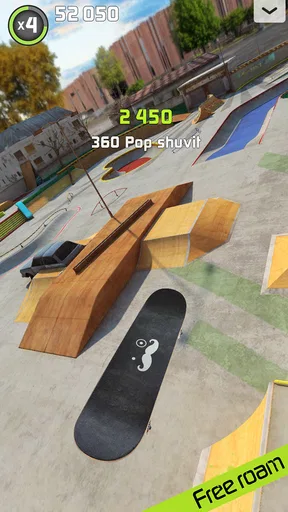
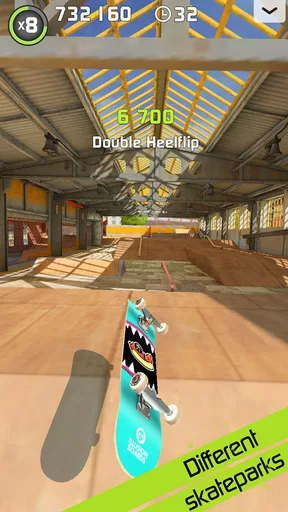
- Three distinct skateparks offer varied layouts and challenges.
- Replay feature helps review runs and improve technique.
- Realistic physics create satisfying landings and trick combinations.
- Works well for short sessions without requiring a constant internet connection.
Limitations of Touchgrind Skate 2
- The learning curve can feel steep for players new to touch controls.
- Some advanced content requires in-app purchases to unlock.
- Small on-screen controls may feel cramped on compact phones.
- Repeated challenges can become predictable after extended play.
- Battery usage increases during longer sessions with detailed graphics.
Other Releases by Illusion Labs
View All


Similar Picks in This Category
View All
8 Ball Pool
Miniclip.com4.8

Pooking - Billiards City
AIM TOP GAME TECHNOLOGY LIMITED - pool4.6

Carrom Pool: Disc Game
Miniclip.com4.4

EA SPORTS FC Soccer Mobile 26
ELECTRONIC ARTS4.6

World Soccer League
mobirix4.3

Soccer Cup 2026: Football Game
INLOGIC SPORTS - football tennis golf soccer4.3
Frequently Asked Questions
What is Touchgrind Skate 2, and how does the gameplay work?
Touchgrind Skate 2 is a mobile skateboarding game that lets you control a miniature skateboard using touchscreen gestures. Instead of steering a character directly, you place your fingers on the board to push, turn, ollie, grind, and perform tricks. The controls take some practice, but they offer a satisfying sense of precision once you understand how finger placement affects movement and balance.
Is Touchgrind Skate 2 free to download and play?
Touchgrind Skate 2 can generally be downloaded for free, but the available content may depend on the platform and version you install. The free experience gives you a chance to learn the controls and try the game, while additional features, locations, challenges, or customization options may require in-app purchases. It is worth checking the store listing for current pricing before downloading.
Does Touchgrind Skate 2 work without an internet connection?
Many of the core skating activities in Touchgrind Skate 2 can be enjoyed offline after the game has been installed. This makes it suitable for short sessions while traveling or when you do not have reliable mobile data. However, certain features may require an internet connection, including updates, advertising-related content, purchases, or online services. Availability can vary by device and game version.
Is Touchgrind Skate 2 suitable for beginners?
Touchgrind Skate 2 is accessible to new players, but it is not an instantly easy game. The finger-based controls feel unusual at first, and landing tricks consistently requires timing, coordination, and repeated practice. Beginners should start with basic movements and tutorials rather than attempting advanced combinations immediately. Players who enjoy learning technical controls will likely appreciate the gradual improvement and challenge.
What devices are compatible with Touchgrind Skate 2, and does it require much storage?
Touchgrind Skate 2 is designed for compatible Android and iOS smartphones and tablets, although exact requirements may change as the game receives updates. A relatively recent device is recommended for smoother graphics, responsive controls, and stable performance. Before installing, check the official Google Play or App Store listing for supported operating-system versions and make sure you have enough free storage for the download and future updates.
Play our best games!


